
Configuration
Set up currencies, exchange rates, switcher defaults, checkout notices, and CRM sync. More control, same plugin.
Everything lives in one place: FluentCart → Settings → Multi-Currency. The settings now include a dedicated Switcher tab for global switcher defaults. Seven tabs, each with a specific job. You can also get there directly via:
/wp-admin/admin.php?page=fluent-cart#/settings/multi-currency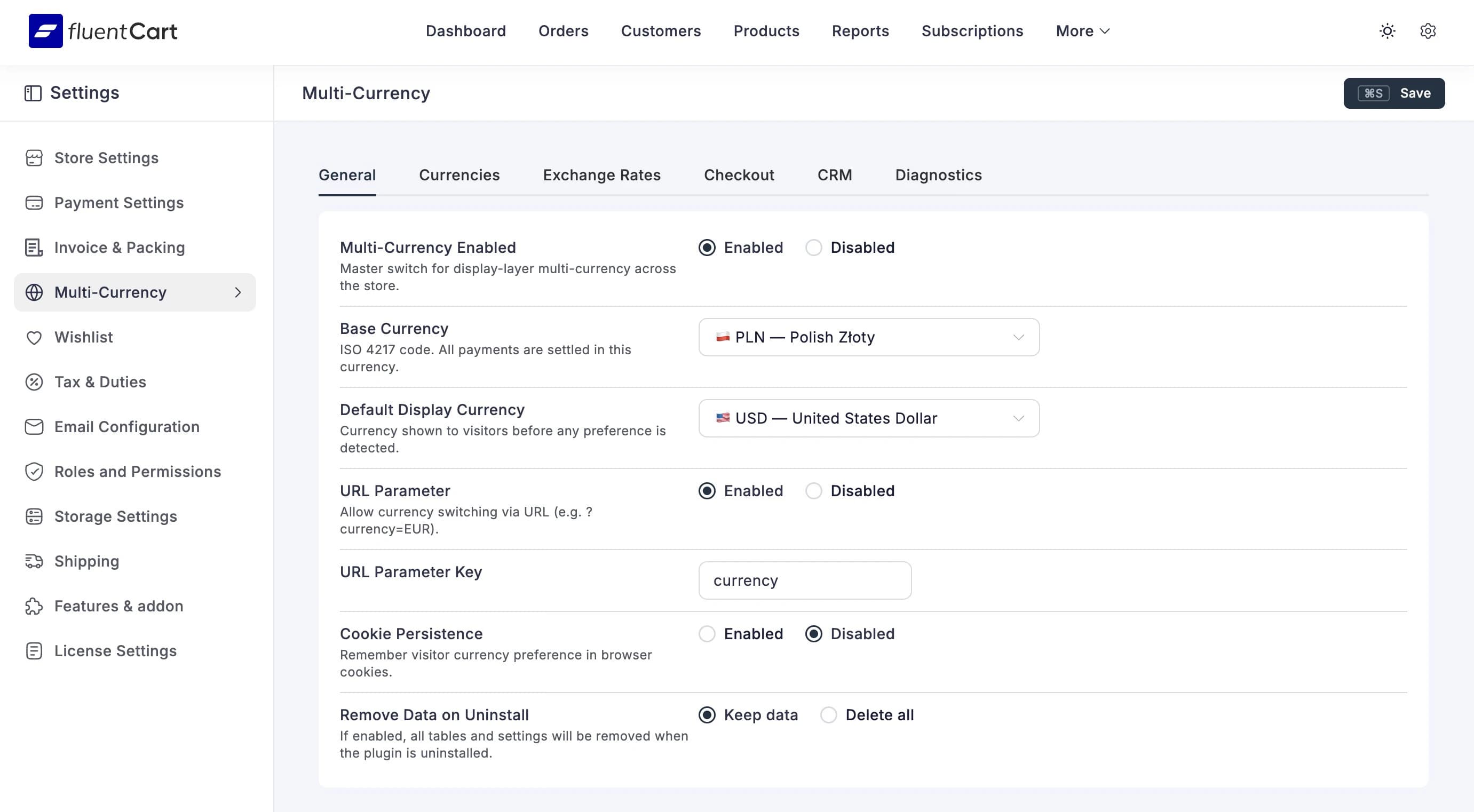
Save Shortcut
Cmd+S (Mac) or Ctrl+S (Windows) saves from any tab. Because clicking buttons is so 2019.
General
The on/off switches and basic preferences. Start here.
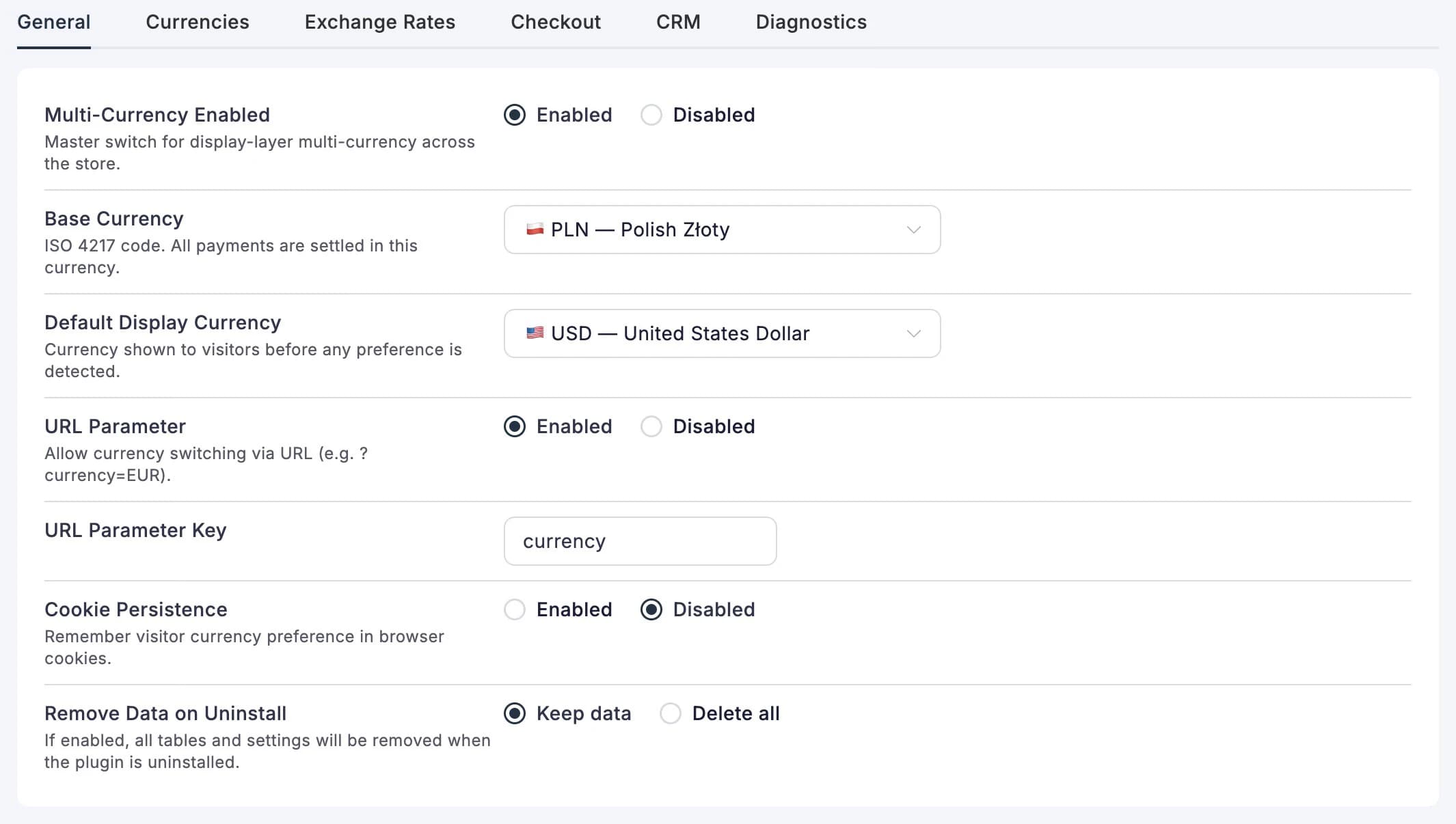
Multi-Currency Enabled
The master switch. Flip it to Enabled and the plugin starts working — prices convert, the switcher appears, checkout notices show up. Flip it to Disabled and everything stops, but your settings stay exactly where you left them.
Base Currency
This is the currency your store actually charges in. FluentCart processes payments in this currency, and every exchange rate is calculated relative to it. Multi-Currency reads it directly from FluentCart → Settings → Store Setup; there is no second editable base-currency setting here to drift out of date.
Think Before Changing
Switching your base currency after you've been running for a while? Rates saved for the previous base are ignored immediately, so the storefront safely falls back to the new base until a complete replacement set exists. Refresh the configured remote provider, or save a complete set on the Manual provider. Existing orders keep the base currency and rate captured when they were placed.
Default Display Currency
What currency does a brand-new visitor see? If someone lands on your site for the first time — no cookie, no account, no URL parameter — this is the currency they get. Usually you'd set this to match your base currency, but if most of your traffic comes from, say, Germany, you might default to EUR.
URL Parameter
When enabled, you can link people directly to a specific currency:
yourstore.com/shop?currency=GBPHandy for email campaigns or regional ads. The "URL Parameter Key" field lets you change currency to something else if it conflicts with another plugin (unlikely, but possible).
A ?currency= link shows the recipient that currency for the page they land on,
without overwriting a preference they had already set — a shared link should not
quietly rewrite somebody else's choice. Switching does not add the parameter: the
browser applies the currency in place, so there is nothing to clean out of the
address bar afterwards. Campaign links stay in the address bar unless they match an already
confirmed browser choice.
Cookie Persistence
Should the plugin remember which currency a visitor picked? When enabled, their choice is saved in a browser cookie and mirrored in local storage for the same configurable lifetime, 90 days by default. They come back next week — still in EUR. No need to pick again. The cookie contains the three-letter code; the mirror contains the same code and its expiry time. It exists so the storefront can recover when an edge host serves one shared page without consulting the cookie.
When disabled, the browser mirror is removed and every page load starts fresh from the default display currency. Most stores want this on.
Account Persistence
Separate from browser cookies, this controls whether logged-in users keep their preference in their account metadata.
- Enabled — logged-in users keep their selected currency across sessions
- Disabled — logged-in users behave like a fresh session unless another resolver wins
This is useful when you want to test or demo the site as an authenticated user without your old preference overriding the configured default display currency.
Remove Data on Uninstall
Leave this on Keep data unless you're absolutely sure you're done with the plugin. When set to Delete all, removing the plugin wipes everything — rate history, settings, saved currency preferences. There's no undo.
Currencies
This is where you build the menu of currencies your visitors can choose from.
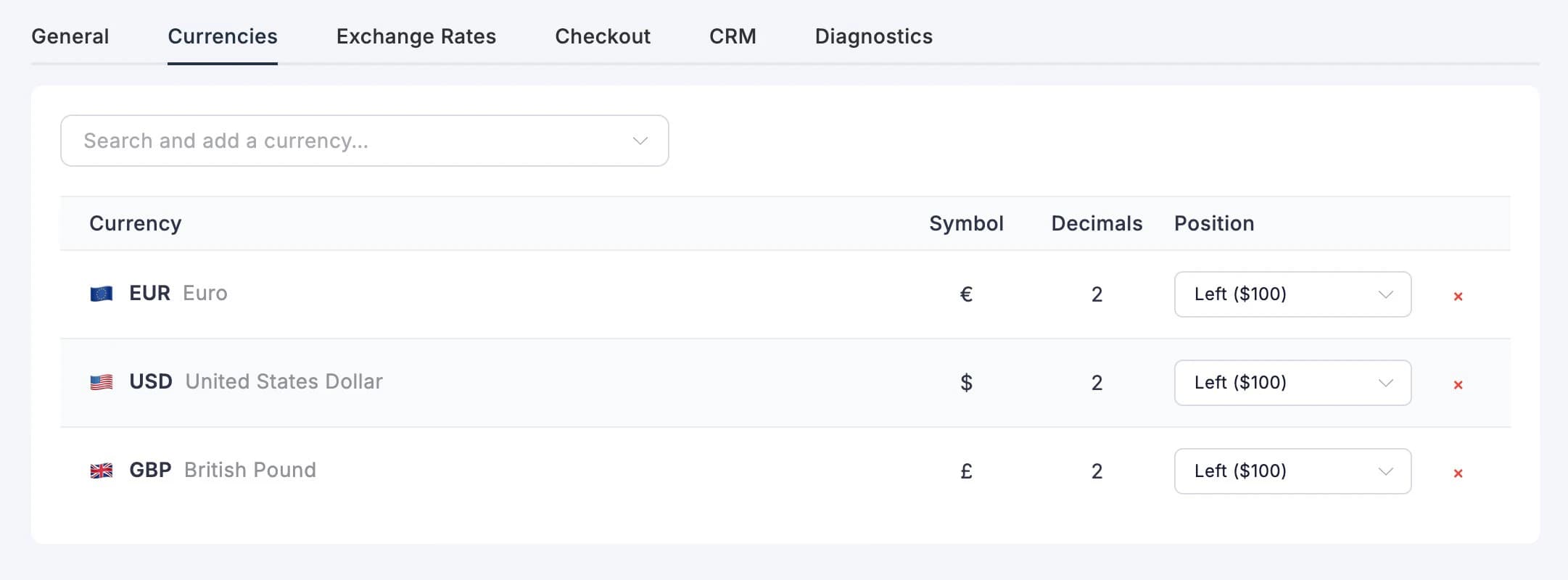
Use the search field at the top to find currencies from FluentCart's own catalogue. Click one to add it to your list. Multi-Currency does not maintain a competing list: names, symbols and zero-decimal defaults come from the FluentCart 1.6.1 currency APIs. Each currency in the table shows:
- Flag — the emoji flag for that country/region
- Code — the three-letter code (EUR, GBP, PLN, etc.)
- Symbol — what appears next to the price (€, £, zł)
- Decimals — how many decimal places to show (usually 2)
- Position — where the symbol goes: before the number ($100), after (100€), or with a space
You can customise:
- symbol
- decimals
- position
- decimal separator
- thousand separator
for each currency individually. FluentCart identifies zero-decimal currencies; its catalogue otherwise defaults to two decimals, so set three or four here when your display currency needs them. Hit the red x to remove one. If it was the default display currency, the default safely returns to FluentCart's base currency.
Drag currencies up or down to control the order they appear in the currency switcher. The order you set here is the order your visitors see.
The Base Currency Is Automatic
Once at least one display currency is configured, the switcher includes FluentCart's base currency automatically. You may keep it in the list to control its order and presentation, but you do not have to add it merely to let visitors switch back.
After adding or removing currencies, save this page and then refresh the remote provider or save the complete Manual rate set. A configured currency without a usable rate cannot be selected; the switcher keeps the existing preference and says why. An older stored preference whose rate later becomes unusable safely resolves to the base currency. Optimistic exchange rates are not a feature, despite what the average crypto dashboard suggests.
Switcher
This tab defines the global defaults used by switcher blocks that inherit from admin settings.
Preset
Pick the default visual treatment:
- Default
- Pill
- Minimal
- Subtle
- Glass
- Contrast
Trigger Defaults
Choose what the closed switcher button shows:
- flag
- code
- symbol
- name
Dropdown Defaults
Choose what each option row shows:
- flags
- codes
- symbols
- names
- active checkmark
Favorites and Search
You can define:
- inline search as the default search mode
- favorite currencies via comma-separated ISO codes
- whether favorites should appear first
Layout Defaults
Set the baseline behavior for inheriting blocks:
- label position
- size
- width mode
- dropdown position
- dropdown direction
Footer Context
You can enable any combination of:
- freshness badge
- exchange rate line
- checkout/base-currency note
This is useful when you want trust-building context without manually configuring every block instance.
Fast QA Setup
If you want a ready-made page that includes the block family, use the Currency Showcase block pattern. It inserts the switcher, current currency, exchange rate, context notice, and selector buttons in one shot.
Exchange Rates
Where the actual conversion numbers come from, how often they update, and what happens when they don't.
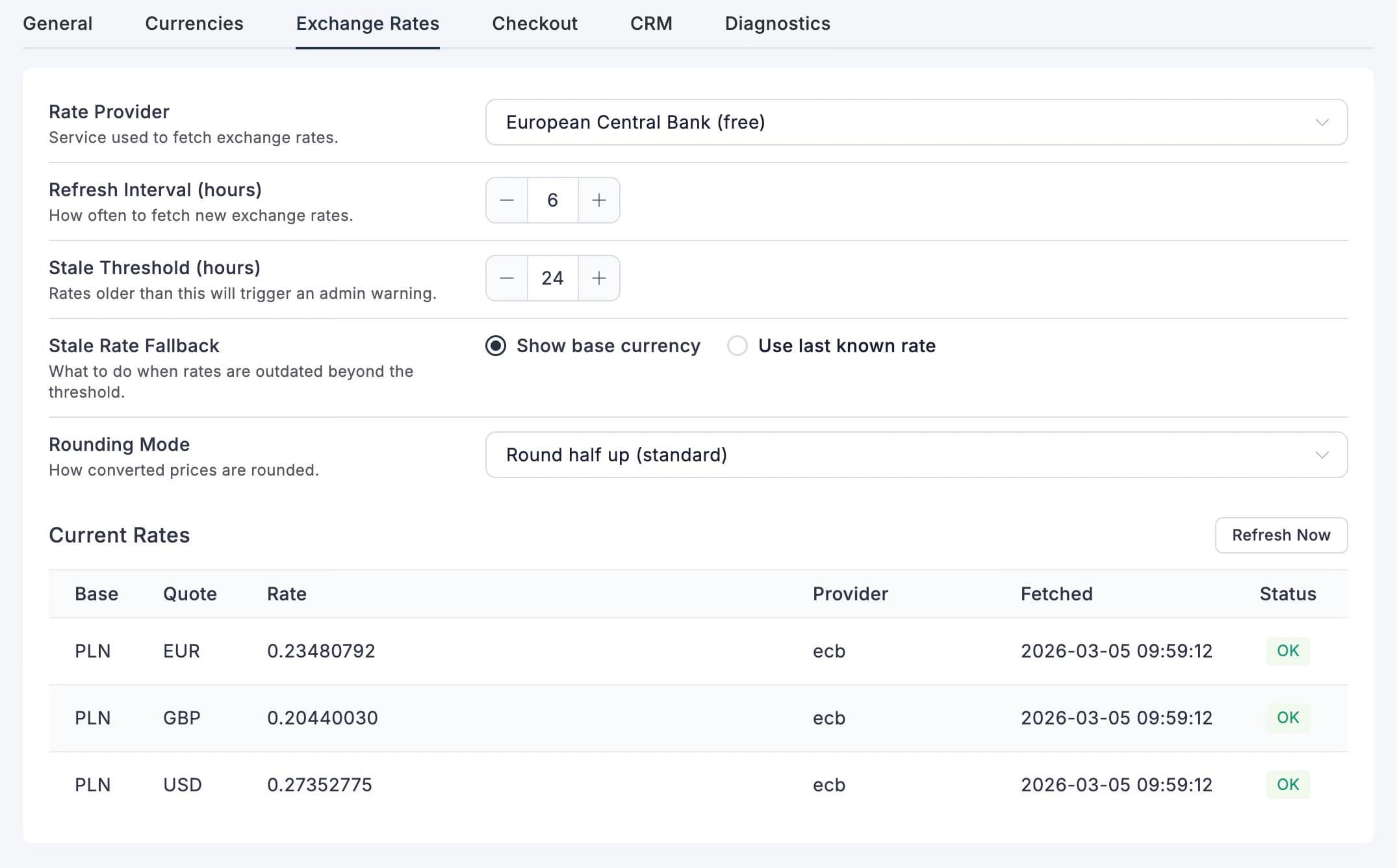
Rate Provider
Pick where your exchange rates come from:
| Provider | API Key? | Best For |
|---|---|---|
| Exchange Rate API | Yes | Most stores. Wide coverage, generous free tier. |
| Open Exchange Rates | Yes | Alternative if Exchange Rate API doesn't cover your currencies. |
| European Central Bank | No | Free, no signup needed. Covers ~30 major currencies. |
| Manual | No | Control freaks. Set your own rates, no external calls. |
The API key field only shows up when the provider needs one. For ECB, there's nothing to configure — just select it and go.
Refresh Interval
How often the plugin fetches fresh rates. Default is every 6 hours, which works for most stores. You can go as low as every hour (if you're paranoid about rate changes) or as high as once a week (if you're not).
Stale Threshold
How old a rate can get before the plugin considers it "stale" and starts warning you. Default is 24 hours. When rates go stale:
- You'll see a warning in your WordPress dashboard
- The currency switcher shows a red dot instead of green
- The stale fallback kicks in (see below)
Stale Rate Fallback
What should happen if rates are stale?
- Show base currency — safe option. Visitors see your base currency prices instead of potentially outdated conversions.
- Use last known rate — keeps showing converted prices even if the rate is old. The switcher badge makes it clear the rates aren't fresh.
Rounding Mode
After the exchange rate math, how should converted prices be rounded?
- Round half up — the standard.
€12.345becomes€12.35. This is what you want 99% of the time. - Round half down — rounds
.5down instead of up - Ceil — always rounds up
- Floor — always rounds down
- None — truncates to the currency's decimal places without rounding (33.337 → 33.33)
Current Rates
The bottom of the tab shows your live rates — base currency, converted currency, the rate, which provider fetched it, when, and whether it's fresh (green OK) or stale.
Remote providers show Refresh Now. A refresh succeeds only when the provider returns a valid rate for every configured display currency, so a half-updated table never gets to cosplay as current data. Manual mode instead shows one input per configured display currency and Save Manual Rates; all values are saved as one complete snapshot.
Checkout
Controls what your customers see during checkout when they're viewing prices in a different currency.
Checkout Disclosure
This is the notice that tells customers: "Hey, you're looking at prices in EUR, but you'll actually be charged in USD." It's important — keeps things transparent, avoids chargebacks from confused customers.
- Enabled — on by default, and you should probably leave it that way
- Disclosure Text — customise the message. You can use these placeholders:
| Placeholder | Replaced With | Example |
|---|---|---|
{base_currency} | Your store's charge currency | USD |
{display_currency} | What the visitor is viewing | EUR |
{rate} | The current exchange rate | 0.92140000 |
The default text is: "Your payment will be processed in {base_currency}."
If you leave it blank, a generic fallback kicks in: "Prices shown in EUR are approximate. You will be charged in USD." — always clear, always honest.
The notice shows up in three places automatically: below the checkout summary, inside the cart drawer, and on the cart page.
Rate Freshness Badge
Adds a small "Rates updated 2 hours ago" line with a green dot in the currency switcher dropdown. If rates are stale, the dot turns red. Gives visitors confidence that the prices they're seeing are current.
CRM
Connects Multi-Currency to FluentCRM and FluentCommunity. These settings only matter if you have those plugins installed — if you don't, this tab still shows up but nothing will fire.
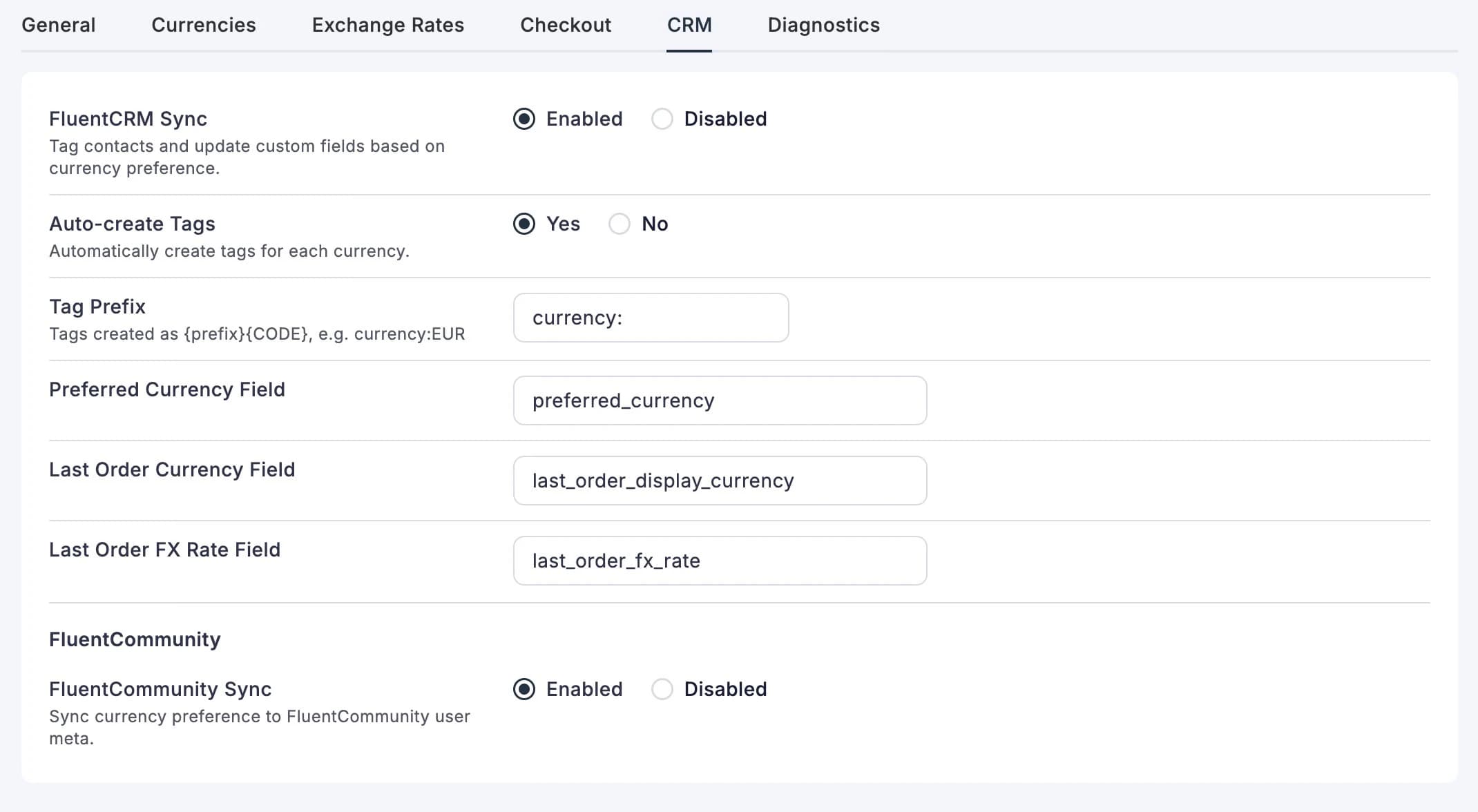
FluentCRM Sync
When enabled, the plugin automatically tags your FluentCRM contacts based on their currency preference. A customer who browses in EUR gets a currency:EUR tag. Someone who pays in GBP gets tagged too. This lets you segment your email lists by currency — send promotions in the right currency, target specific regions, that kind of thing.
| Setting | What It Does |
|---|---|
| FluentCRM Sync | Master switch for all CRM tagging and field updates |
| Auto-create Tags | Automatically creates tags like currency:EUR when a new currency is detected |
| Tag Prefix | What goes before the currency code in the tag name. Default: currency: |
| Preferred Currency Field | Which custom field stores the visitor's browsing currency |
| Last Order Currency Field | Which custom field stores the currency they last paid in |
| Last Order FX Rate Field | Which custom field stores the exchange rate from their last order |
The field names are customisable in case they clash with fields you've already set up. Most people leave the defaults alone.
See FluentCRM Integration for the full breakdown of what syncs and when.
FluentCommunity Sync
One toggle. When enabled, the plugin saves each user's preferred currency to their FluentCommunity profile. That's it — simple, no configuration needed beyond flipping the switch.
See FluentCommunity Integration for details.
Diagnostics
Nothing to configure here — this is your health check dashboard. Useful when something isn't working and you need to figure out why (or when support asks "what does your diagnostics tab show?").
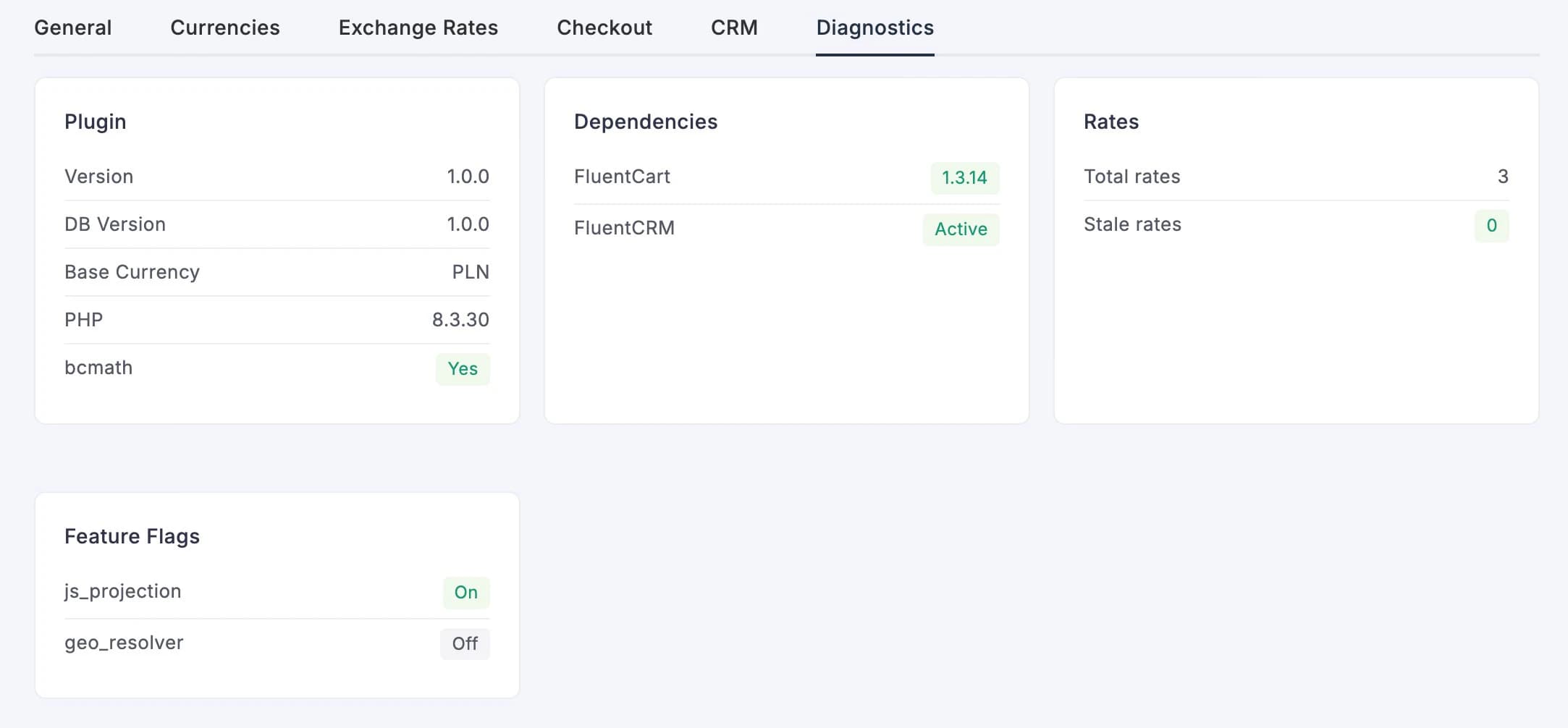
Four cards at a glance:
| Card | What It Tells You |
|---|---|
| Plugin | Version number, database version, base currency, PHP version, and whether bcmath is available |
| Dependencies | Whether FluentCart and FluentCRM are active (with version numbers) |
| Rates | Total number of stored rates and how many are stale |
| Feature Flags | Internal toggles — js_projection (price conversion on the page) and geo_resolver (geolocation, not yet production-ready) |
If something looks off — a red badge, a missing dependency, stale rates — this is where you'd spot it first.
Quick Setup Checklist
Just installed? Here's the fastest path to a working multi-currency store:
- General tab → Make sure it is Enabled and confirm the base currency read from FluentCart. Change it in FluentCart Store Setup if needed.
- Currencies tab → Add the display currencies your customers use, then save. FluentCart's base currency is included automatically.
- Exchange Rates tab → Pick a provider (ECB is free and works great for major currencies). Hit Refresh Now.
- Checkout tab → Leave disclosure enabled. Customise the text if you want.
- Drop the shortcode → Add
[fchub_currency_switcher]to your header, menu, or wherever makes sense. See Currency Switcher for details.
That's it. Five steps, five minutes, and your store now speaks multiple currencies.
All Settings Reference
All settings are stored as a single array under the fchub_mc_settings WordPress option. Mostly useful if you're building an integration or debugging via WP-CLI.
| Key | Type | Default | Description |
|---|---|---|---|
enabled | string | yes | Master switch |
base_currency | string | FluentCart store currency | Read-only base transaction currency |
display_currencies | array | [] | Array of currency config objects |
default_display_currency | string | USD | Fallback display currency |
url_param_enabled | string | yes | URL parameter switching |
url_param_key | string | currency | URL parameter name |
cookie_enabled | string | yes | Cookie persistence |
cookie_lifetime_days | int | 90 | Cookie lifetime in days |
geo_enabled | string | no | Geolocation auto-detect |
geo_provider | string | ip_api | Geolocation provider slug |
geo_api_key | string | "" | Geolocation API key |
rate_provider | string | manual | Exchange rate provider |
rate_provider_api_key | string | "" | Rate provider API key |
rate_refresh_interval_hrs | int | 6 | Cron refresh interval (hours) |
stale_threshold_hrs | int | 24 | Stale rate threshold (hours) |
stale_fallback | string | base | Stale behaviour: base or last_known |
rounding_mode | string | half_up | Rounding mode |
checkout_disclosure_enabled | string | yes | Checkout disclosure notice |
checkout_disclosure_text | string | Your payment will be processed in {base_currency}. | Disclosure template |
show_rate_freshness_badge | string | yes | Switcher rate badge |
fluentcrm_enabled | string | yes | FluentCRM sync |
fluentcrm_auto_create_tags | string | yes | Auto-create currency tags |
fluentcrm_tag_prefix | string | currency: | Tag prefix |
fluentcrm_field_preferred | string | preferred_currency | CRM field: preferred currency |
fluentcrm_field_last_order | string | last_order_display_currency | CRM field: last order currency |
fluentcrm_field_last_rate | string | last_order_fx_rate | CRM field: last order rate |
fluentcommunity_enabled | string | yes | FluentCommunity sync |
uninstall_remove_data | string | no | Delete everything on uninstall |