
FCHub Stream (Discontinued)
Historical documentation for the discontinued FluentCommunity video plugin. Unsupported, with critical maintenance fixes only.
Maintenance suspended indefinitely
WordPress media library wasn't built for video in 2025. You know it. I know it. Your users uploading 2GB files definitely know it.
FCHub Stream was built to address this. Users could upload videos directly to streaming CDNs (Cloudflare Stream or Bunny.net), with transcoding and embedding handled automatically. The documentation below is retained as historical reference, not a promise that the plugin still works with current versions.
Why This Exists
Since FluentCommunity launched, the official roadmap has been flooded with requests for direct video upload. Not YouTube embeds. Not Vimeo links. Direct video upload.
Here's the problem: it's 2025. 82% of internet traffic is video. User-generated video gets 4x higher engagement than anything else. Communities without video upload are like restaurants without WiFi in 2025. Technically functional. Practically embarrassing.
But FluentCommunity's current solution? Upload your video to YouTube first. Copy the link. Paste it into your community post. Hope your users have YouTube accounts. Hope they don't mind the extra steps. Hope nobody questions why they're promoting Google instead of your community.
Convenient for exactly nobody.
WPManageNinja (the FluentCommunity developers) didn't have time to build this. Fair. They're busy. So I built it instead. Direct uploads to Cloudflare Stream or Bunny.net. No YouTube detour. No media library gymnastics. No manual video conversion.
And that's how FCHub Stream exists.
The YouTube Detour Tax
Your users shouldn't need a YouTube account to participate in your community. They shouldn't upload to Google's platform to share on yours. FCHub Stream fixes this. Direct uploads. Your streaming provider. Your community stays yours.
What It Does
Direct Video Upload
Users upload videos via your FluentCommunity straight to Cloudflare Stream or Bunny.net. No WordPress server bottleneck. No storage limits.
Automatic Transcoding
Your streaming provider handles all video processing. Multiple formats. Multiple resolutions. Adaptive bitrate streaming. You don't touch any of it.
Seamless Embedding
Videos embed automatically in FluentCommunity posts and comments. Responsive player. Mobile-friendly. Works on desktop. No manual embed codes.
Two Providers. Zero Regrets.
Choose Cloudflare Stream or Bunny.net. Both work. Switch between them if needed. One provider at a time (because complications are for enterprise software).
Feature Highlights
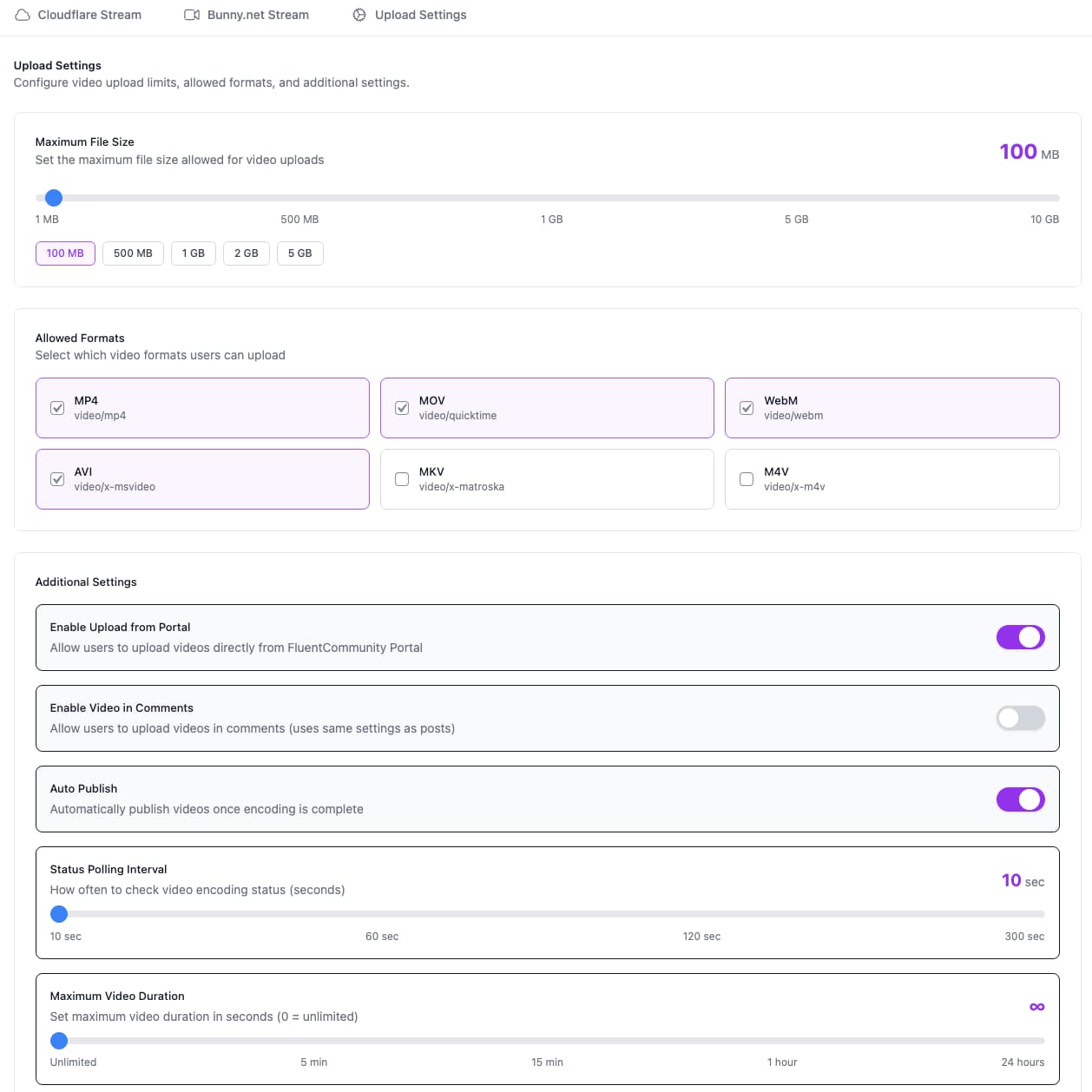
Videos go straight from user's browser to your streaming provider. WordPress server never touches the file. No PHP upload limits. No temporary file drama.


Supported formats:
Default file size limit: 500MB (configurable up to provider limits)
Your streaming provider transcodes everything to web-optimized formats. Users upload whatever they have. Provider handles the rest.
Once uploaded, your streaming provider:
- Transcodes to multiple resolutions (4K, 1080p, 720p, 480p, 360p, 240p)
- Generates adaptive bitrate streams
- Creates video thumbnails
- Enables seek previews
- Handles mobile/desktop optimization
You configure it once. It works forever. Or until your provider has API downtime. But that's their problem.
FCHub Stream listens for webhook callbacks from your streaming provider. When video processing completes:
- Video status updates automatically
- Player embeds refresh with ready-to-stream content
- Users get notified (if notifications enabled)
- No manual "check if video is ready" polling
Webhooks require SSL/HTTPS on your site. Most hosting has this by default. If yours doesn't, fix that first. It's 2025.
Users can upload videos in:
- Posts - Standard feed posts with video content
- Comments - Reply with video instead of just text
Admins control where video uploads are allowed. Enable for posts only, or allow comments too. Your community, your rules.
- CSRF Protection - WordPress nonce verification on all uploads
- File Validation - Format and size checks before upload starts
- Permission Checks - Only logged-in users with post permissions can upload
- Webhook Verification - HMAC-SHA256 signature validation for Cloudflare webhooks
- API Key Encryption - Sensitive credentials encrypted in database
Because unsecured file uploads are how you end up on security blogs.
Pick Your Streaming Provider
FCHub Stream supports two streaming providers. Pick one. Both work. Neither is sponsored (unfortunately).
Cloudflare Stream

Good if:
- You're already using Cloudflare
- You want global CDN by default
- You value webhook reliability
Pricing:
- $5 per 1,000 minutes stored
- $1 per 1,000 minutes delivered
Setup complexity: Medium (requires API token creation)
Bunny.net Stream

Good if:
- You want cheaper pricing
- You're not using Cloudflare
- You prefer simpler setup
Pricing:
- $0.01 per GB stored ($10 per TB)
- $0.005 per GB delivered ($5 per TB for high-volume)
- Regional pricing: $0.01/GB (EU/NA) to $0.06/GB (Africa/ME)
Generally cheaper for most use cases. Math not guaranteed.
Setup complexity: Medium (requires library creation)
Can't decide? Start with Bunny.net. It's cheaper for most communities. Switch later if needed. Configuration is stored separately for both providers.
Technical Specs
Built this properly. Modern PHP 8.3+. WordPress Coding Standards compliant. PSR-12. Modular architecture. Not the kind of plugin where you open the code and immediately regret your life choices.
What that means in practice:
- Clean separation of concerns (controllers, services, models)
- REST API endpoints that follow WordPress conventions
- Encrypted credentials in database (not plaintext like it's 2010)
- CSRF protection on all uploads (nonce verification)
- Automated linting via PHPCS (enforced before commits)
- Vue.js admin interface (not jQuery spaghetti)
- Composer for dependencies (modern PHP practices)
Legacy code is for legacy plugins. This isn't one of them.
Requirements
- WordPress: 6.7 or higher
- PHP: 8.3 or higher
- FluentCommunity: Must be installed and active
- Streaming Provider: Cloudflare Stream OR Bunny.net account with API access
- SSL/HTTPS: Required for webhooks and secure uploads
PHP 8.3+ is required. If your WordPress is still on PHP 7.x, it's time to upgrade anyway. This is a feature, not a bug.
Performance
- Upload Speed: Depends on user's internet and provider infrastructure
- Processing Time: 1-5 minutes for most videos (provider-dependent)
- Server Load: Minimal (uploads bypass WordPress server)
- Database Impact: Lightweight (stores video metadata only)
Architecture
- Modular Design - Separation of concerns, single responsibility
- REST API Endpoints - Clean API for portal integration
- Service Layer - Business logic isolated from controllers
- Vue.js Admin Interface - Modern admin panel for settings
- PSR-12 Compliant - WordPress coding standards + modern PHP practices
Storage
Videos are stored by your streaming provider. WordPress database stores:
- Video ID and provider reference
- Upload metadata (user, timestamp, title)
- Processing status
- Player embed data
Total database footprint per video: ~1KB. Your hosting will survive.
What You Don't Need
- Extra storage space on your WordPress server
- Special PHP extensions for video processing
- Server-side transcoding tools (FFmpeg, etc.)
- A degree in video encoding
- Patience to manually convert videos
- Tolerance for WordPress media library limitations
Built Out of Necessity
FCHub Stream exists because WordPress media library and video streaming have irreconcilable differences. After watching enough uploads fail for reasons that made no sense, waiting for them to get along stopped being a viable strategy.
So it got built. Direct uploads to streaming providers. No media library gymnastics. No manual transcoding. Video streaming that actually works.
Two providers supported. Not revolutionary. Just functional. Which, surprisingly, is better than most WordPress video solutions.
Pick your provider. Upload videos. Move on with your life.
Ready to start?
- Download
fchub-stream.zipfrom GitHub Releases - Install on WordPress
- Configure your streaming provider
- Upload videos
Or jump straight to: