
Content Protection
How FCHub Memberships protects content across your WordPress site — posts, pages, custom post types, taxonomies, menus, URLs, comments, and special pages.
Content protection decides who can see what and what everyone else sees instead. Version 1.4.0 adds a guided workflow so the first decision is “what should I protect?” rather than “which internal resource key sparks joy?”
Guided Protection Wizard
Go to Memberships > Content and choose Protect content.
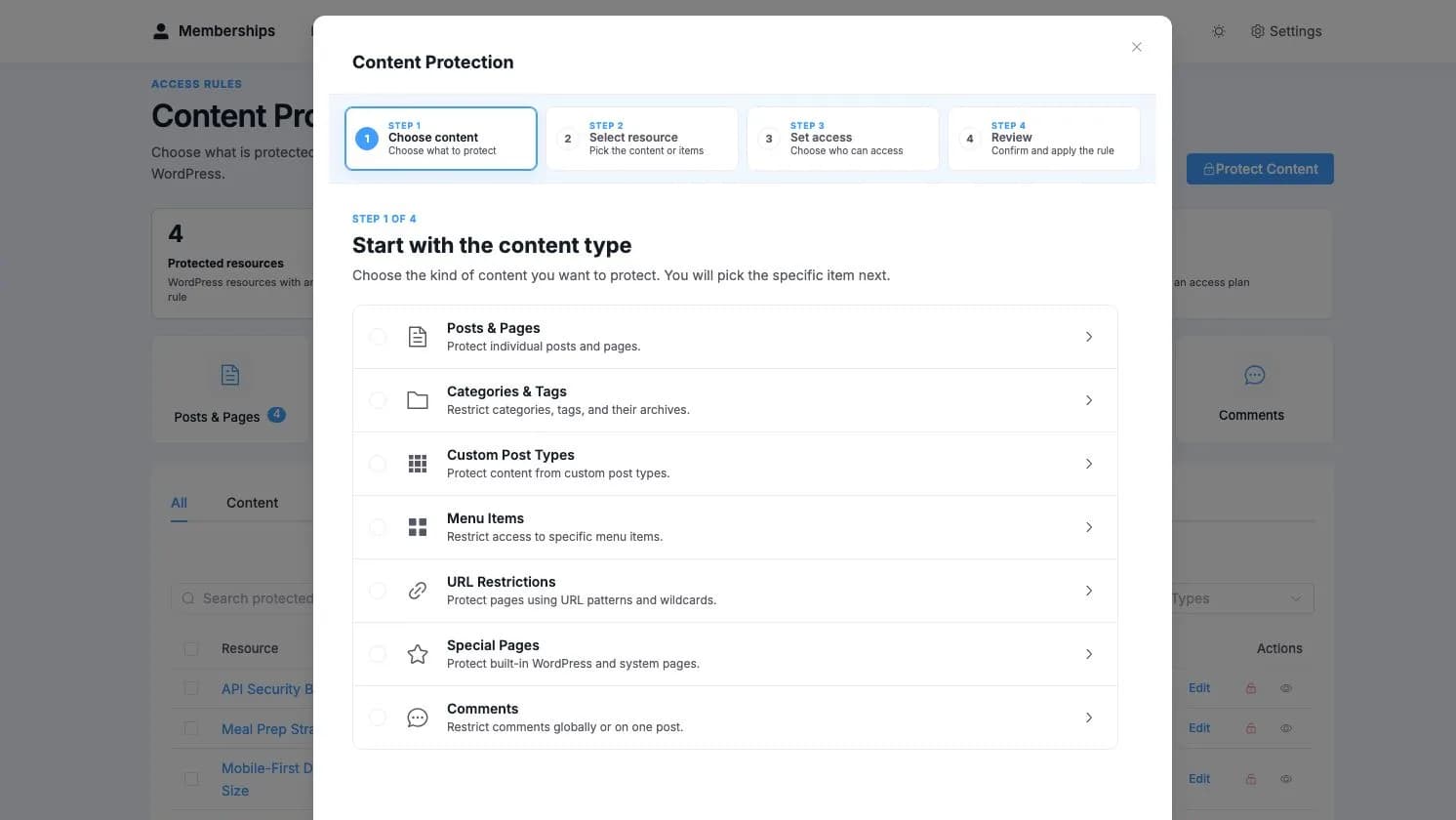
Choose content
Start with posts and pages, categories and tags, custom post types, menu items, URL patterns, special pages, or comments.
Select the resource
Browse or search for the exact item. The picker uses friendly labels and keeps the technical identifiers out of the way.
Set access
Choose the plans that unlock it and decide whether visitors should see a message, follow a redirect, or get a teaser.
Review
Confirm the resource, audience, and visitor experience, then apply the rule.
How Protection Works
When a visitor requests protected content, Memberships looks at every valid source of access before deciding what to show:
- direct access to the resource;
- access through one or more membership plans;
- access inherited from a protected category or taxonomy;
- access that begins later through a drip schedule;
- paused or ended memberships;
- the configurable administrator preview.
If access is not available, the visitor sees the message, redirect, or teaser you selected. Protected content is also filtered from feeds, archives, search, and REST responses where applicable, because hiding the page while publishing the full article elsewhere would be an ambitious interpretation of protection.
Protection Modes
You can configure how restricted content appears to non-members:
| Mode | Behavior |
|---|---|
| Restriction Message | The original content is replaced with a customizable message, plan names, and optional CTA button |
| Redirect | The visitor is redirected to a URL you specify (pricing page, login page, etc.) |
| Teaser | Part of the content is shown as a teaser, followed by the restriction message |
Teaser Options
When teaser mode is enabled, you can choose how much content to reveal:
| Teaser Mode | Description |
|---|---|
none | No teaser — show restriction message only |
excerpt | Show the post excerpt |
more_tag | Show content before the <!--more--> tag |
words | Show the first N words (configurable, 1-500) |
custom | Show custom teaser text that you write |
Each post can have its own teaser configuration through the Membership Protection meta box, or you can set a site-wide default in Memberships settings.
Protection by Resource Type
The ContentProtection class is the primary protection handler for posts, pages, and custom post types. It hooks into:
the_content(priority 999) — replaces content with restriction messageget_the_excerpt(priority 999) — filters excerpts for protected contenttemplate_redirect— handles full-page redirects when protection mode is set to redirectpre_get_posts— excludes protected posts from archive queries (when enabled in settings)rest_prepare_{post_type}— filters content in REST API responses
Per-Post Protection: Edit any post or page and look for the Membership Protection meta box in the sidebar. Here you can:
- Toggle protection on/off
- Select which plans grant access
- Choose a teaser mode and configure it
- Write a custom restriction message (supports
{plan_names},{login_url},{pricing_url},{user_name}placeholders) - Set a CTA button with text and URL
Bulk Protection: Select multiple posts in the post list and use the bulk actions dropdown to "Protect with Membership" or "Remove Membership Protection". This creates or removes protection rules in bulk.
Implicit Protection:
Posts that appear in any plan's content rules are automatically protected — you don't need to set per-post protection for them. The AccessEvaluator.isProtected() method checks both explicit protection rules and plan rule membership.
Archive Filtering:
When "Hide protected content in archives" is enabled in settings, protected posts are excluded from archive pages, the blog index, and search results for non-members. Members still see protected posts in these listings. This uses the pre_get_posts hook to add post__not_in exclusions.
Admin Bypass
By default, administrators (users with manage_options capability) bypass all content protection. They always see full content regardless of membership status. This is configurable in Memberships > Settings via the admin_bypass setting.
Restriction Message Placeholders
Custom restriction messages support these placeholders:
| Placeholder | Replaced With |
|---|---|
{plan_names} | Comma-separated list of active plans that grant access to this content |
{login_url} | WordPress login URL with return to the current page |
{pricing_url} | Your pricing page URL (configured in settings) |
{user_name} | The current user's display name, or "Guest" for logged-out visitors |
{unlock_date} | The drip unlock date (only in drip-locked context) |
REST API Content Filtering
Protected content is also filtered in WordPress REST API responses. When a non-member requests a post through the REST API:
- The
content.renderedfield is replaced with the restriction message - A
content.protectedflag is set totrue - Excerpts are filtered based on teaser settings
This ensures that headless WordPress setups and third-party apps respect membership protection.
Cache Invalidation
The AccessEvaluator maintains two levels of caching:
- Per-request cache — static array cache cleared at the end of each request
- Transient cache — WordPress transients with 5-minute TTL for batch access checks
Cache is automatically invalidated when:
- A grant is created, revoked, paused, resumed, or renewed
- Protection rules are modified
- The
AccessEvaluator::clearUserCache()orAccessEvaluator::clearCache()methods are called
The ContentProtection class listens to all grant lifecycle hooks and clears the relevant user's cache when their membership status changes.