I Built a Wishlist Plugin Because FluentCart Didn't Have One
Guest wishlists, FluentCRM automation, auto-remove on purchase, GDPR export — because a heart button is never just a heart button.
Every e-commerce store needs a wishlist. It's one of those features that sounds so simple you'd assume every platform has one built in. FluentCart doesn't. So I built it.
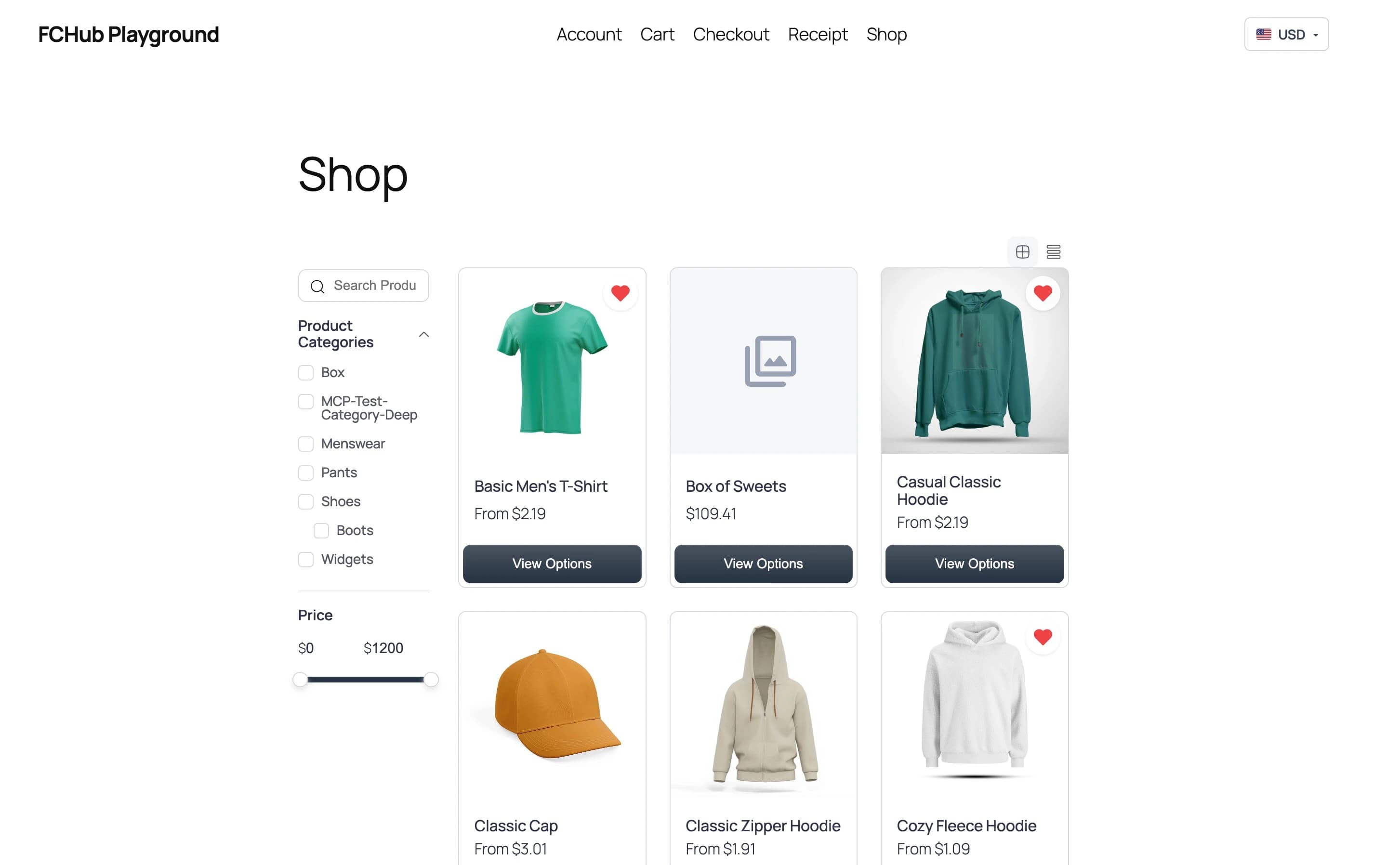
I built FCHub Wishlist — a proper wishlist system for FluentCart with guest support, FluentCRM automation, auto-remove on purchase, and GDPR export. Because apparently a heart icon next to a product card is never just a heart icon. It's a database table, a cookie, a merge strategy, a cron job, and a compliance checkbox.
Here's what it took.
The "Just Add a Heart Button" Fallacy
The brief was simple: let people save products they like. Click heart, product saved. Click again, product removed. Logged-in users get persistent wishlists. Done. Ship it. Go home.
Then reality showed up uninvited.
What about guests? They should get wishlists too — you don't force someone to create an account before they're allowed to want something. But guest wishlists need session tracking. Session tracking needs cookies. Cookies need cleanup. Cleanup needs cron jobs. Cron jobs need batch processing so you don't nuke the database on a site with 50,000 abandoned guest sessions.
And when a guest finally logs in or registers? Their guest wishlist needs to merge into their user wishlist. Without duplicates. Without losing anything. Atomically.
The Merge-on-Login Problem
Guest wishlists live in the database identified by a session hash stored in an httpOnly cookie. When the user logs in, I need to move their guest items into their real wishlist. Sounds like a simple UPDATE query. It isn't.
Two users could theoretically log in at the same time on the same session (shared computer, kiosk scenario). Or a user could have multiple tabs open. Or WordPress could fire set_logged_in_cookie before wp_login in some authentication flows — because of course it does.
The fix: MySQL row-level locking with SELECT ... FOR UPDATE inside a transaction.
$wpdb->query('START TRANSACTION');

// Lock both wishlist rows to prevent concurrent merges
$wpdb->query($wpdb->prepare(
    "SELECT id FROM {$listsTable} WHERE id IN (%d, %d) FOR UPDATE",
    $guestWishlist['id'],
    $userWishlist['id']
));

// Delete guest items that already exist in user's wishlist
$wpdb->query($wpdb->prepare(
    "DELETE guest_items
     FROM {$itemsTable} guest_items
     INNER JOIN {$itemsTable} user_items
        ON user_items.wishlist_id = %d
       AND user_items.product_id = guest_items.product_id
       AND user_items.variant_id = guest_items.variant_id
     WHERE guest_items.wishlist_id = %d",
    $userWishlist['id'],
    $guestWishlist['id']
));

// Move remaining guest items to user's wishlist
$wpdb->query($wpdb->prepare(
    "UPDATE {$itemsTable} SET wishlist_id = %d WHERE wishlist_id = %d",
    $userWishlist['id'],
    $guestWishlist['id']
));

$wpdb->query('COMMIT');
Three queries inside a transaction: lock both rows, delete duplicates with a self-join, move the rest. If anything fails, rollback. No partial merges, no orphaned items, no race conditions. The kind of code that's boring to read and terrifying to get wrong.
I also hook into three WordPress events — wp_login, user_register, and set_logged_in_cookie — because WordPress doesn't guarantee which one fires first in every auth flow. Belt, braces, and a third backup system. The set_logged_in_cookie handler checks if wp_login already ran to avoid double-merging. Defensive programming at its finest.
FluentCRM: Because a Wishlist Is Marketing Data
A wishlist isn't just a user convenience. It's intent data. Someone who adds a product to their wishlist is telling you, in the clearest possible terms, "I want this but not right now." That's a remarkably useful signal if you've got a CRM.
FCHub Wishlist integrates with FluentCRM in four ways:
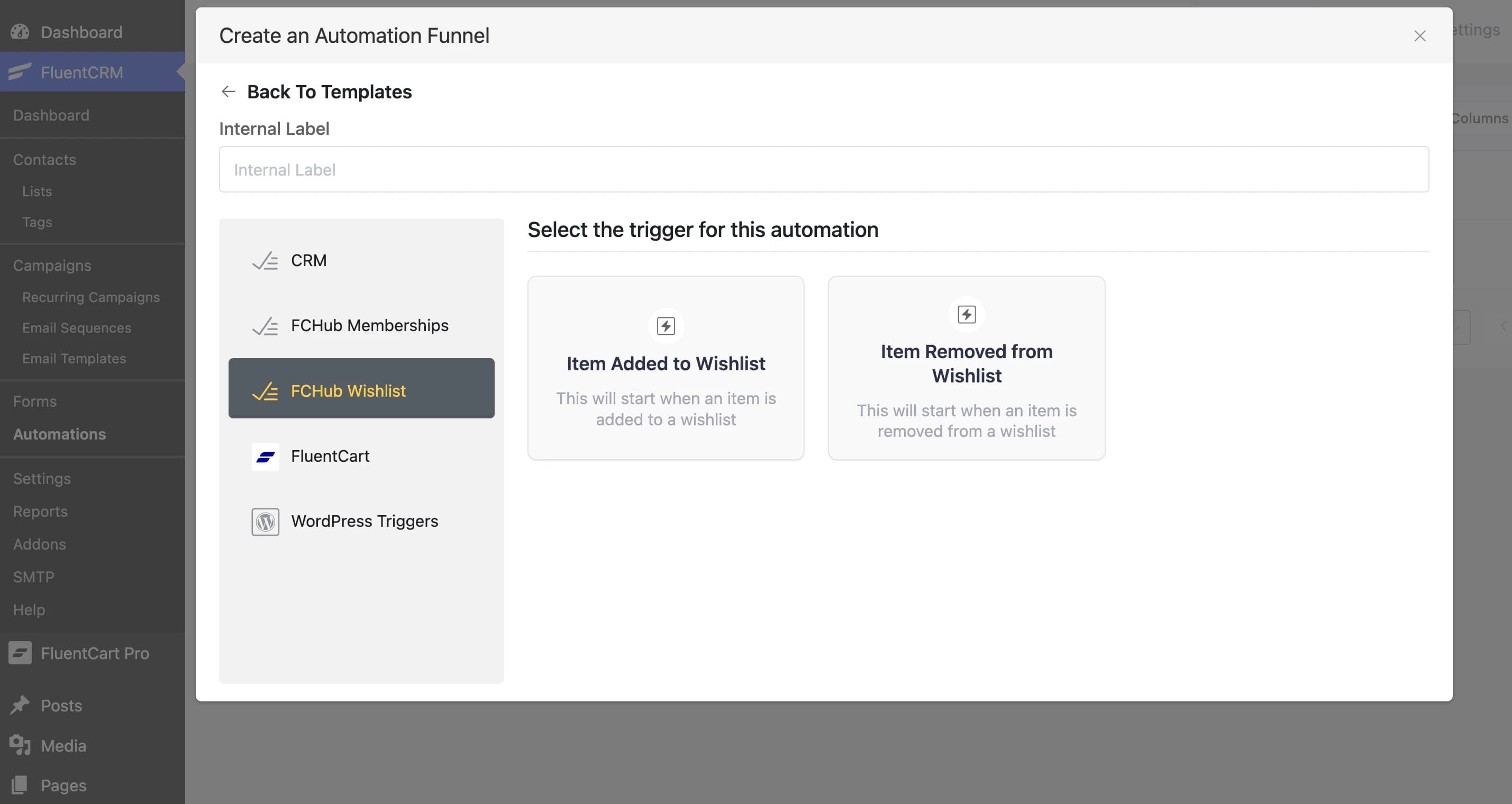
Automation triggers — "Item Added to Wishlist" and "Item Removed from Wishlist" fire as FluentCRM triggers. Build automations that send a follow-up email when someone wishlists a specific product. Or tag contacts who wishlist items in a particular category. Or start a drip sequence. The usual CRM shenanigans.
Automation actions — "Add Product to Wishlist" lets your automations programmatically add items to a contact's wishlist. Running a campaign? Auto-populate wishlists for contacts in a segment. Slightly dystopian, very effective.
Contact segments — Filter your contact lists by wishlist behaviour. "Has items in wishlist," "has specific product in wishlist," "wishlist contains more than N items." Your email campaigns can now target people based on what they want, not just what they've bought.
Profile section — A "Wishlist" tab appears in each FluentCRM contact profile, showing their current wishlist items. Your support team can see what a customer is interested in without asking.
Auto-Remove After Purchase
This one's genuinely satisfying. When a customer buys something that's on their wishlist, the plugin automatically removes it. Because nothing says "poor UX" like a wishlist full of things you already own.
The PurchaseWatcher hooks into FluentCart's order_paid_done event, extracts the product+variant pairs from the order, matches them against the user's wishlist items, and deletes the matches. It uses a hash map lookup — product_id:variant_id as the key — so it's O(n) regardless of wishlist size.
A fchub_wishlist/items_auto_removed action fires after removal, so other systems (FluentCRM tags, analytics, your custom code) can react. The whole thing is toggleable via a setting. Some stores might want purchased items to stay in the wishlist as a "previously bought" reference. Weird, but not my place to judge.
The Customer Portal Problem
FluentCart has a customer portal — a frontend dashboard where customers manage orders, subscriptions, and downloads. Adding a "My Wishlist" tab to it should be straightforward. And it mostly is, except for one thing.
The portal renders tab content via a render_callback that fires after the page has already loaded. Your PHP callback outputs HTML and enqueues scripts. Standard WordPress pattern. One problem: by the time your script loads, DOMContentLoaded has already fired. If your JavaScript waits for DOMContentLoaded — like every well-behaved script does — it waits forever.
// On the customer portal the script is enqueued inside a render_callback
// that runs after DOMContentLoaded has already fired. Handle both cases.
if (document.readyState === "loading") {
    document.addEventListener("DOMContentLoaded", boot);
} else {
    boot();
}
Check readyState. If the document is still loading, register the listener. If loading has finished, call boot() immediately. Four lines that took an embarrassingly long time to debug because the symptom was "it works everywhere except the customer portal" and the cause was "a timing assumption baked into every JavaScript tutorial since 2010."
GDPR: The Feature Nobody Asks For But Everyone Needs
WordPress has a built-in personal data export/erasure system. Most plugin developers ignore it. I didn't.
FCHub Wishlist registers both an exporter and an eraser. When a site admin processes a GDPR data request, wishlist items are included in the export (product name, variant, price at the time of addition, date added). When someone requests data deletion, all their wishlist items, the wishlist itself, and any FluentCRM tags are wiped.
It's the kind of feature that generates zero "wow" moments and exactly one "thank you for not making me fail a compliance audit" moment per affected customer.
What Ships in v1.0.0
A heart button. That's all anyone asked for.
| Feature | Why It Exists |
|---|---|
| Heart icons on product cards | Because that's literally the brief |
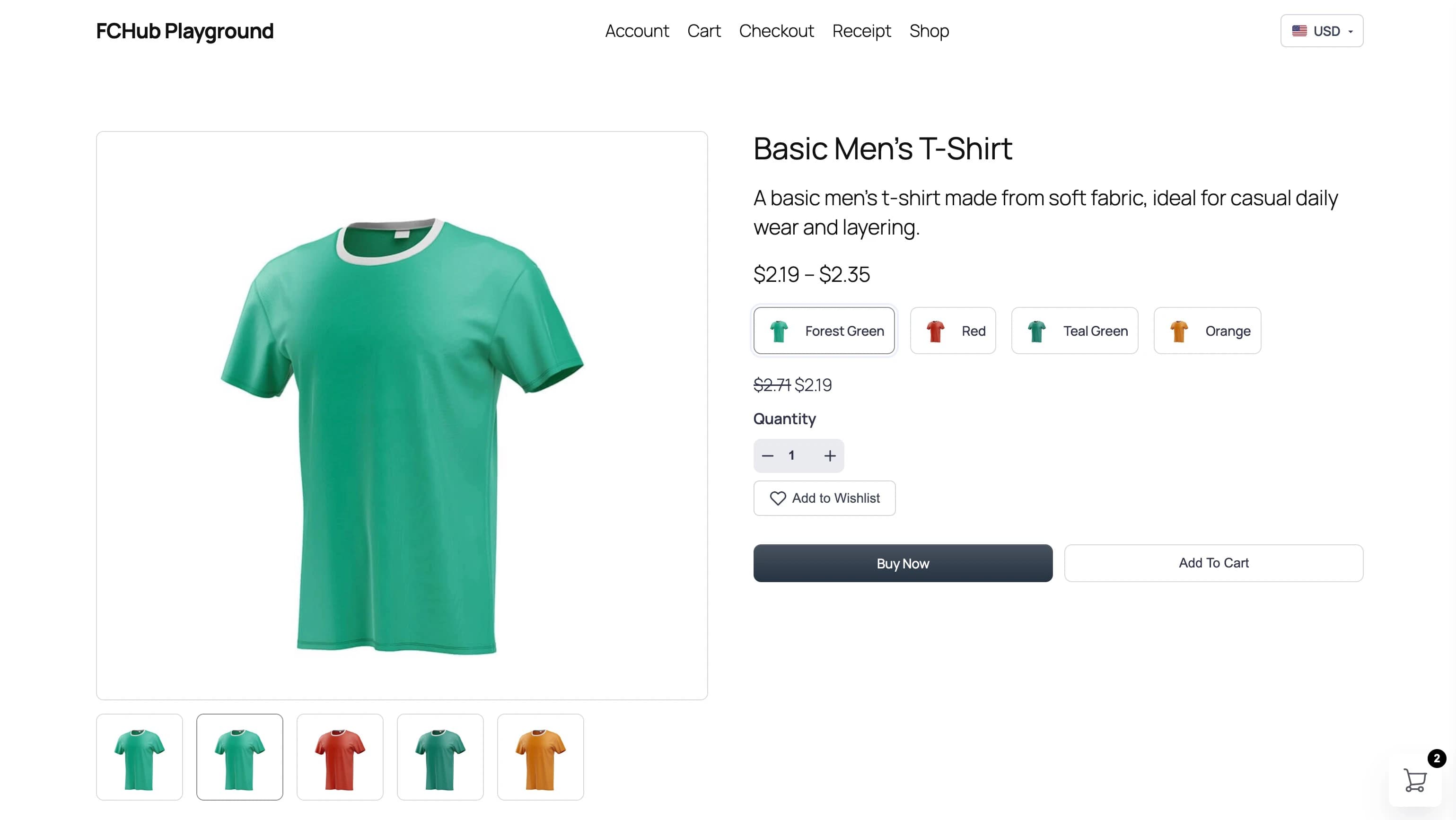
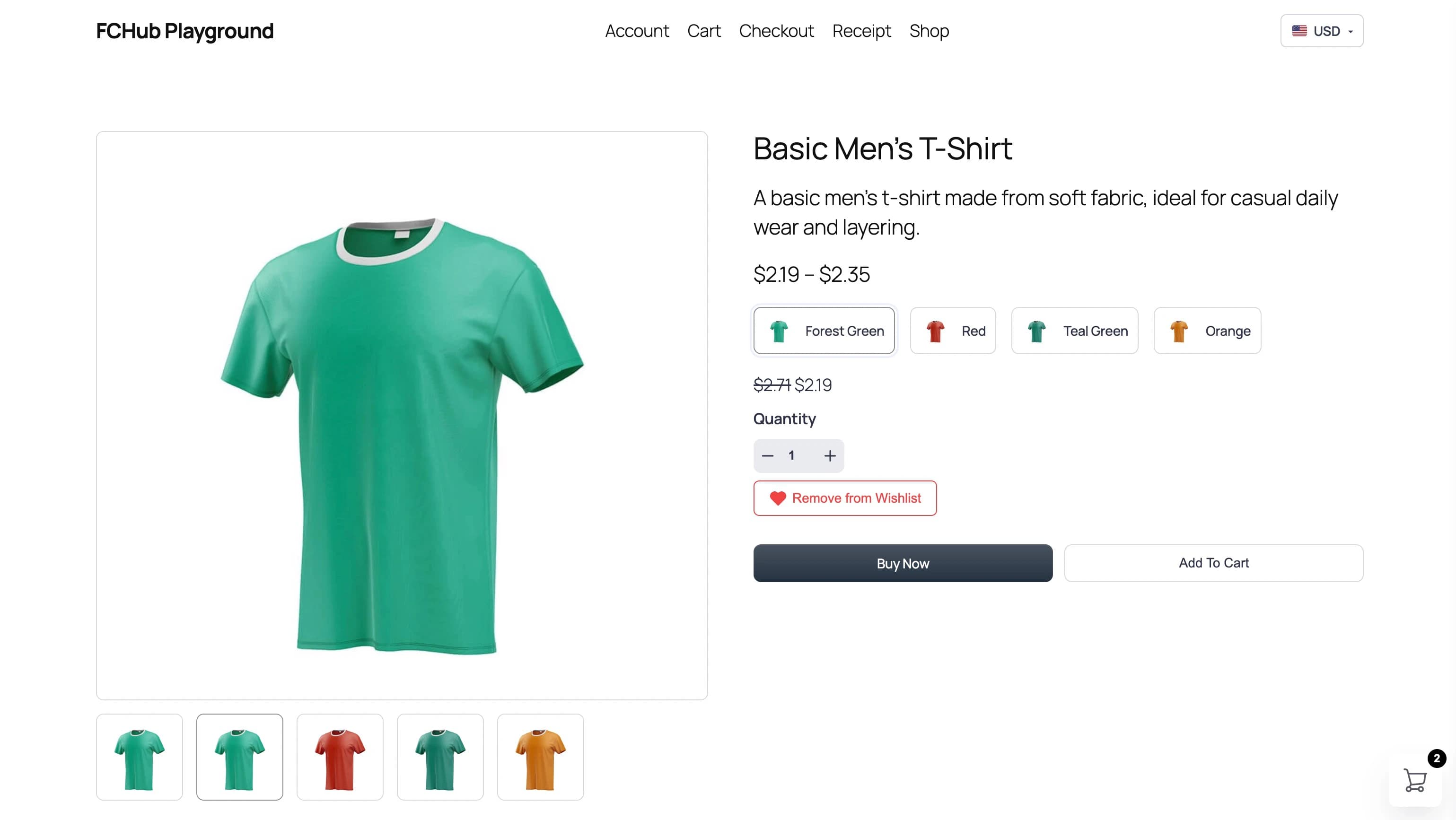
| Single product "Add to Wishlist" button | Some people want words, not just icons |
| Customer portal tab with pagination | So customers can admire things they haven't bought |
| Variant-aware wishlisting | Because "I want the blue one" and "I want the red one" are different desires |
| Guest wishlists with 30-day expiry | You don't make people create an account before they're allowed to want things |
| Atomic merge-on-login | Three auth hooks and a transaction because WordPress can't pick one login event |
| Auto-remove purchased items | A wishlist full of things you already own is just a receipt |
| FluentCRM triggers + actions | Your CRM should know what people want, not just what they've bought |
| Contact segments by wishlist | "Email everyone who wants this but hasn't bought it" — marketing's favourite sentence |
| Wishlist reminder emails | Gentle nudges. Configurable frequency. Not spam. Probably. |
| Orphan cleanup cron | Deleted products shouldn't haunt wishlists forever |
| GDPR export + erasure | Because the EU doesn't care about your sprint velocity |
| Counter badge shortcode | A number in a circle. Took 4 lines. Felt good. |
| Admin stats dashboard | So you can see which products people want but refuse to pay for |
Try It
FCHub Wishlist is free and open source. Install it alongside FluentCart and your customers can start wanting things properly.
Now if you'll excuse me, I need to go add "built a wishlist" to my CV under "heart surgery."